Hyper-V Server
UPDATED April 2024
The majority of applications run perfectly fine when set up on the Fresh Start machine with DaDesktop (DD). A couple of programs, however, may not behave as intended after cloning, and require some additional steps to function properly.
System Details
- Hyper-V Server 2019 and newer (other versions will likely exhibit the same behaviour)
- Installed via the Windows 10 / Windows Server 2019 template
Fresh Start Fix Notes
-
Keep in mind that this is a general guide for resolving the issue within Fresh Start. The exact steps might vary based on your particular setup and configuration.
-
Summary—Fix on Fresh Start as follows: Hyper-V suffers from duplicate MAC address conflicts on the External switch after being cloned from the FreshStart machine. To avoid this, we either pick the second pre-configured Intel network adapter or delete the external switch from the FreshStart machine before cloning, which is explained in more detail below.
Fix procedure
1. Below you can see the Hyper-V Manager window. Right-click and choose Virtual Switch Manager.
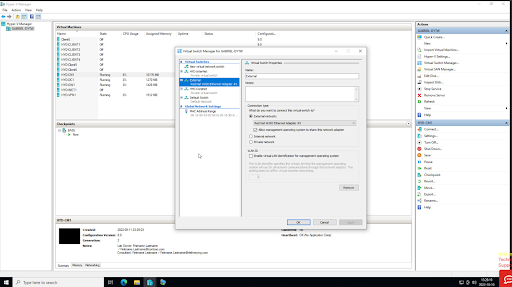
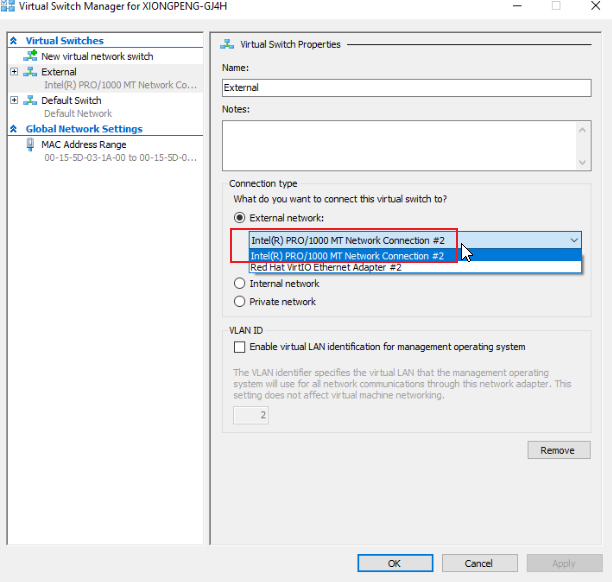
2. In the Virtual Switch Manager dialog pictured below, select the 'External' switch, and then pick the Intel Pro/1000 network connection as indicated. Note: This option is only present with newer Windows 10 templates, version 71 and above. Click OK, and save the configuration if prompted. Close the Hyper-V Manager application.
3. Proceed with the FreshStart machine configuration as needed. Once that's finished, shut down the machine from within the VM, waiting until it has completely stopped. Then clone the FreshStart machine to the Trainer and Participant machines as necessary.
The Hyper-V server should now operate correctly on both the Trainer and Participant machines. Without this change, participants may see each other’s machines rather than their own, because the cloned external network card results in duplicate MAC addresses on the External switch after being copied from the FreshStart machine.
If you continue to experience problems, feel free to reach out to DaDesktop Support through the chat app, and we’ll be glad to assist.