Course VPN

The Course VPN (CVPN) feature provides the ability for desktops to connect directly with each other. 

It supersedes the "Turn off network isolation" option. Previously, when network isolation was disabled, desktops on a single server could interact with any other desktop on that server, but communication between different servers or data centres was not supported. 

Course VPN now enables any desktop included in a specific course to communicate seamlessly, regardless of which server or data centre they are hosted on.

This functionality is exclusively available for Ubuntu and Windows 10 operating systems.  For other operating systems, you can still rely on the "Turn off network isolation" setting.

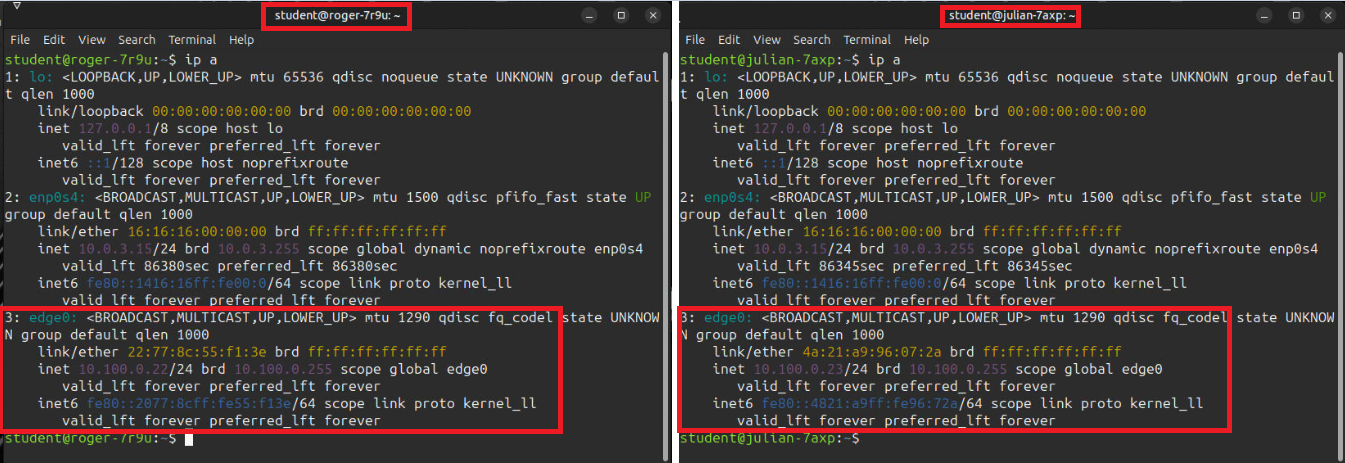
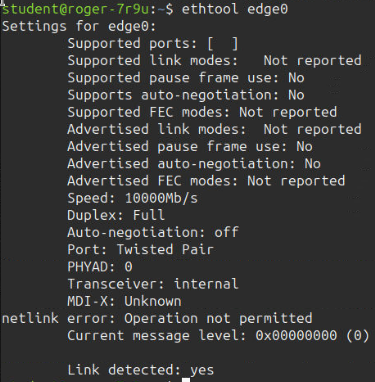
The following screenshots depict the CVPN interface as seen from a terminal session.  They also highlight some extra details of the attached network interface.


Terminal IPs:

These screenshots display the VPN network interface that is created automatically when training workstations are provisioned.  Shown below are two student workstation terminals, both listing the `edge0` network interface, which represents the course VPN.

two student workstation terminals displaying


 Extra Interface Details:

ethtool Additional Propertiessystemctl Additional Properties


Supported Platforms:

This applies when a course is built using Ubuntu or Windows 10 operating systems.


suported  Ubuntu or Windows 10

Unsupported Configurations:

Courses created with other operating system distributions are not supported.


Not supported OS